linthis 是一个用 Rust 编写的快速、跨平台的多语言代码检查和格式化工具。它提供统一的命令行接口,支持 18+ 种编程语言,并且拥有插件系统和主流编辑器扩展。
1. 核心特性
1.1 单命令,多语言
linthis 最大的特点是一个命令搞定所有语言的代码检查和格式化:
# 检查并格式化当前目录(默认行为)
linthis

# 仅检查,不格式化
linthis -c

# 仅格式化,不检查
linthis -f

# 检查 Git 暂存的文件(适合 pre-commit)
linthis -s
1.2 支持的语言
| 语言 | Linter | Formatter |
|---|---|---|
| Rust | clippy | rustfmt |
| Python | ruff, pylint, flake8 | ruff, black |
| TypeScript | eslint | prettier |
| JavaScript | eslint | prettier |
| Go | golangci-lint | gofmt |
| Java | checkstyle | google-java-format |
| C | clang-tidy, cppcheck | clang-format |
| C++ | clang-tidy, cpplint, cppcheck | clang-format |
| Objective-C | clang-tidy | clang-format |
| Swift | swiftlint | swift-format |
| Kotlin | detekt | ktlint |
| Lua | luacheck | stylua |
| Dart | dart analyze | dart format |
| Shell/Bash | shellcheck | shfmt |
| Ruby | rubocop | rubocop |
| PHP | phpcs | php-cs-fixer |
| Scala | scalafix | scalafmt |
| C# | dotnet format | dotnet format |
1.3 自动检测
linthis 会自动检测项目中使用的编程语言,无需手动配置:
# 自动检测并处理所有支持的语言
linthis

# 也可以指定特定语言
linthis -l python,rust,typescript
2. 安装
2.1 通过 pip 安装(推荐)
# 使用 pip
pip install linthis

# 使用 uv(推荐,更快)
uv pip install linthis
2.2 通过 cargo 安装
cargo install linthis
3. 配置系统
3.1 项目配置
使用 linthis init 命令创建配置文件:
# 创建项目配置文件 (.linthis/config.toml)
linthis init

# 创建全局配置文件 (~/.linthis/config.toml)
linthis init -g
生成的 .linthis/config.toml 配置示例:
# 指定要检查的语言(不指定则自动检测)
languages = ["rust", "python", "javascript"]

# 排除的文件和目录
excludes = [
    "target/**",
    "node_modules/**",
    "dist/**"
]

# 最大圈复杂度
max_complexity = 20

# 代码风格预设
preset = "google"  # 可选: google, airbnb, standard
3.2 配置优先级
配置按以下优先级合并(从高到低):
- CLI 参数:
--option value - 项目配置:
.linthis/config.toml - 全局配置:
~/.linthis/config.toml - 插件配置: 插件中的配置文件
- 内置默认值
3.3 配置管理命令
linthis 提供便捷的命令行配置管理:
# 添加配置
linthis config add excludes "*.log"
linthis config add languages "rust"

# 设置配置
linthis config set max_complexity 15
linthis config set preset google

# 查看配置
linthis config list
linthis config get excludes

# 迁移已有配置
linthis config migrate --from eslint
4. 插件系统
插件系统是 linthis 的核心功能之一,支持通过 Git 仓库共享和复用配置。
4.1 使用插件
# 添加插件到项目
linthis plugin add company https://github.com/mycompany/linthis-standards.git

# 添加到全局配置
linthis plugin add -g company https://github.com/mycompany/linthis-standards.git

# 指定版本/分支
linthis plugin add company https://github.com/mycompany/linthis-standards.git --ref v1.0.0
添加插件后,运行 linthis 时会自动加载插件中的配置。
4.2 管理插件
# 查看已安装的插件
linthis plugin list

# 同步更新插件
linthis plugin sync

# 移除插件
linthis plugin remove company

# 清理插件缓存
linthis plugin clean --all
4.3 创建自定义插件
# 初始化插件
linthis plugin init my-standards
cd my-standards
编辑 linthis-plugin.toml:
[plugin]
name = "my-standards"
version = "1.0.0"
description = "My team's coding standards"

["language.python"]
config_count = 1

["language.python".tools.ruff]
priority = "P0"
files = ["ruff.toml"]
然后将配置文件放入对应的语言目录,推送到 Git 仓库即可使用。
5. Git Hook 集成
5.1 使用内置 Hook 安装
# 安装 pre-commit hook
linthis hook install --type git

# 安装 pre-push hook
linthis hook install --event pre-push

# 查看 hook 状态
linthis hook status
5.2 AI 智能自动修复
linthis 支持在 hook 执行时启用 AI 智能修复,自动修复 lint 问题:
# 安装带 AI 自动修复的 hook
linthis hook install --args "-c -f --fix --ai --provider claude --accept-all"

# 仅检查模式 + AI 修复
linthis hook install --args "-c --fix --ai --provider codebuddy-cli --accept-all"
生成的 hook 命令:
linthis -s -c -f --hook-event=pre-commit --fix --ai --provider claude --accept-all
支持的 AI 提供者:
| 提供者 | 描述 |
|---|---|
claude |
Anthropic Claude API |
claude-cli |
Claude CLI 工具 |
codebuddy |
CodeBuddy API |
codebuddy-cli |
CodeBuddy CLI 工具 |
openai |
OpenAI GPT API |
local |
本地模型(Ollama 等) |
运行 linthis fix --help 或 linthis hook install --help 时,会自动检测当前环境中可用的 AI 提供者并在帮助文本末尾显示:
AI providers (current environment):
  ✓ claude         Anthropic Claude API (available)
  ✓ claude-cli     Claude CLI (available)
    codebuddy      CodeBuddy API
    openai         OpenAI GPT API
    local          Local LLM (Ollama)
选项说明:
| 选项 | 描述 |
|---|---|
--args <ARGS> |
传递给 hook 脚本中 linthis 命令的额外参数,默认 -c -f |
--event <EVENT> |
Git hook 事件类型(pre-commit, pre-push, commit-msg),默认 pre-commit |
5.3 使用 prek(推荐)
prek 是一个高性能的 Git hooks 管理器,完全兼容 pre-commit 配置格式。
# .pre-commit-config.yaml
repos:
  - repo: local
    hooks:
      - id: linthis
        name: linthis
        entry: linthis --staged --check-only
        language: system
        pass_filenames: false
prek install
5.4 AI 编程助手集成
linthis 可以与 AI 编程助手集成,在 AI 辅助开发过程中自动执行代码质量检查。安装后,AI 助手会在修改代码后自动运行 linthis 检查,并在提交前修复问题。
支持的 AI 助手:
| AI 助手 | 规则文件 | 安装策略 |
|---|---|---|
| Claude Code | CLAUDE.md + .claude/settings.local.json |
追加段落 + Stop Hook |
| Cursor | .cursor/rules/linthis.mdc |
独立文件 |
| Windsurf | .windsurf/rules/linthis.md |
独立文件 |
| GitHub Copilot | .github/copilot-instructions.md |
追加段落 |
| Cline | .clinerules/linthis.md |
独立文件 |
| CodeBuddy | .codebuddy/rules/linthis.md |
独立文件 |
# 安装指定 AI 助手
linthis hook install --type agent --provider claude
linthis hook install --type agent --provider cursor

# 自动检测并安装所有已使用的 AI 助手
linthis hook install --type agent -y

# 交互式选择(已检测到的助手排在前面)
linthis hook install --type agent

# 查看状态
linthis hook status

# 卸载 AI 助手集成
linthis hook uninstall --type agent

# 卸载所有 hook(包括 git hook 和 AI 助手集成)
linthis hook uninstall --all -y
交互式选择时,已检测到或已安装的 AI 助手会排在列表前面,同时 --help 会显示当前环境的检测状态:
Agent providers (current environment):
  ✓ Claude Code (detected)
    Cursor
    Windsurf
  ✓ GitHub Copilot (detected)
    Cline
    CodeBuddy
如果选择的助手已经安装,会显示已安装的文件路径和内容:
Info: Claude Code is already installed
       File: /path/to/project/CLAUDE.md
       File: /path/to/project/.claude/settings.local.json
       Content:
       ## Linthis Agent Rules
       ...
安装的规则会指导 AI 助手在修改代码后运行 linthis -i <file> -c 检查,手动阅读错误并修复代码,提交前运行 linthis -s -c 确认通过。
6. 修复功能
linthis 提供强大的修复功能,支持交互式修复和 AI 智能修复。
6.1 基础修复命令
运行 linthis 后,如果发现问题,可以进入修复模式:
# 检查并进入修复模式(交互式)
linthis --fix

# 仅检查模式 + 修复
linthis -c --fix

# 启用 AI 智能修复(交互式选择 provider)
linthis --fix --ai

# 启用 AI 智能修复(指定 provider)
linthis --fix --ai --provider claude

# 全自动修复(无需确认,自动接受所有建议)
linthis --fix --ai --provider claude --accept-all
使用 --ai 但不指定 --provider 时,在终端交互模式下会弹出提供者选择菜单,可用的提供者排在前面:
Select AI provider:

  ✓ 1. claude - Anthropic Claude API (available)
  ✓ 2. claude-cli - Claude CLI (available)
    3. codebuddy - CodeBuddy API
    4. codebuddy-cli - CodeBuddy CLI
    5. openai - OpenAI GPT API
    6. local - Local LLM (Ollama)
    7. Cancel

Choose [1]:
修复相关选项:
| 选项 | 描述 |
|---|---|
--fix |
启用修复模式 |
--ai |
使用 AI 生成修复建议(需要 --fix) |
--provider <NAME> |
指定 AI 提供者(需要 --ai),不指定时交互式选择 |
--accept-all |
自动接受所有修复建议(需要 --ai) |
6.2 交互式修复
不使用 --accept-all 时,修复模式会显示每个问题,让你选择:
- 应用修复 - 接受建议的修复
- 跳过 - 跳过此问题
- 添加 nolint - 添加忽略注释
- 查看上下文 - 查看更多代码上下文
6.3 AI 智能修复
启用 AI 可以获得更智能的修复建议,特别适合复杂的代码问题:
# 交互式 AI 修复(自动选择 provider)
linthis fix --ai
linthis --fix --ai

# 交互式 AI 修复(指定 provider)
linthis fix --ai --provider claude
linthis --fix --ai --provider claude

# 全自动 AI 修复(适合 CI/Hook 场景)
linthis fix --ai --provider codebuddy-cli --accept-all
linthis --fix --ai --provider codebuddy-cli --accept-all

# 使用本地模型
linthis fix --ai --provider local
支持的 AI 提供者:
| 提供者 | 描述 |
|---|---|
claude |
Anthropic Claude API |
claude-cli |
Claude CLI 工具 |
codebuddy |
CodeBuddy API |
codebuddy-cli |
CodeBuddy CLI 工具 |
openai |
OpenAI GPT API |
local |
本地模型(Ollama 等) |
AI 修复的优势:
- 理解代码语义,提供更准确的修复
- 自动处理复杂的重构建议
- 支持批量修复多个相关问题
6.4 配置 AI 提供者
在配置文件中设置默认的 AI 提供者:
# .linthis/config.toml
[ai]
provider = "claude"
model = "claude-sonnet-4-20250514"
也可以通过环境变量配置 API 密钥:
export ANTHROPIC_API_KEY="your-api-key"
export OPENAI_API_KEY="your-api-key"
7. 编辑器扩展
linthis 提供主流编辑器的官方扩展,支持实时诊断、保存时格式化等功能。
7.1 VS Code
从 VS Code Marketplace 安装,或在扩展中搜索 “linthis”。
主要功能:
- 实时显示 lint 诊断
- 保存时自动格式化(可配置)
- 命令面板快捷操作
配置示例 (settings.json):
{
  "linthis.enable": true,
  "linthis.lintOnSave": true,
  "linthis.formatOnSave": true,
  "linthis.usePlugin": "https://github.com/mycompany/linthis-standards.git"
}
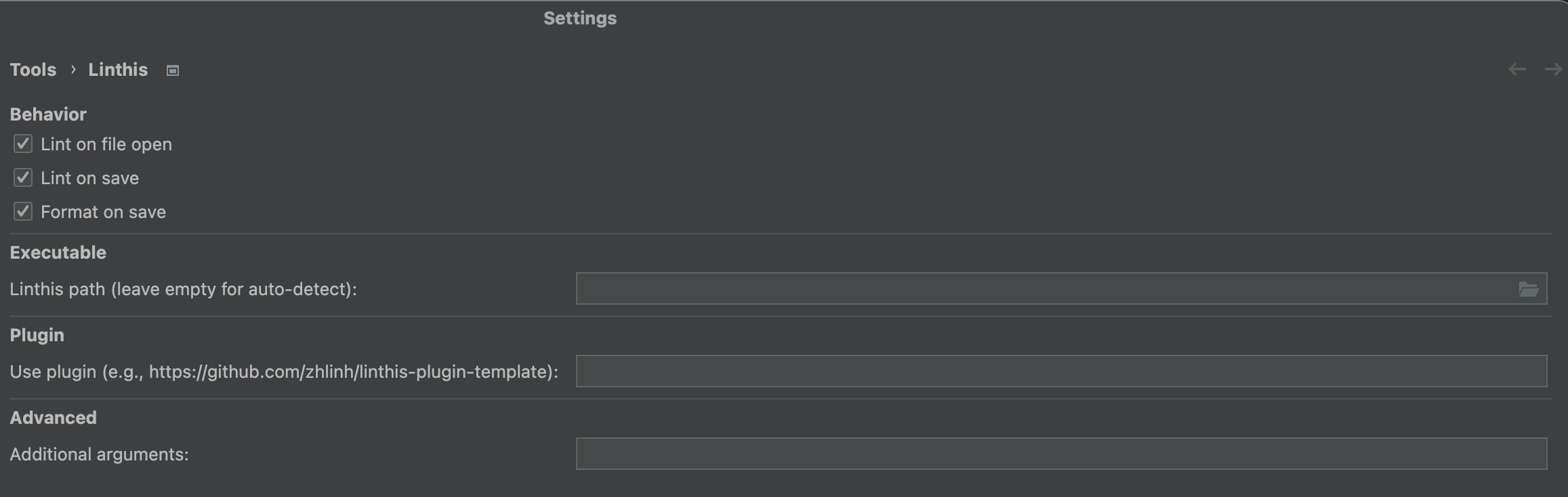
7.2 JetBrains IDE
从 JetBrains Marketplace 安装,或在 Settings → Plugins 中搜索 “linthis”。
前置依赖:需要先安装 LSP4IJ 插件。
主要功能:
- 基于 LSP 的实时诊断
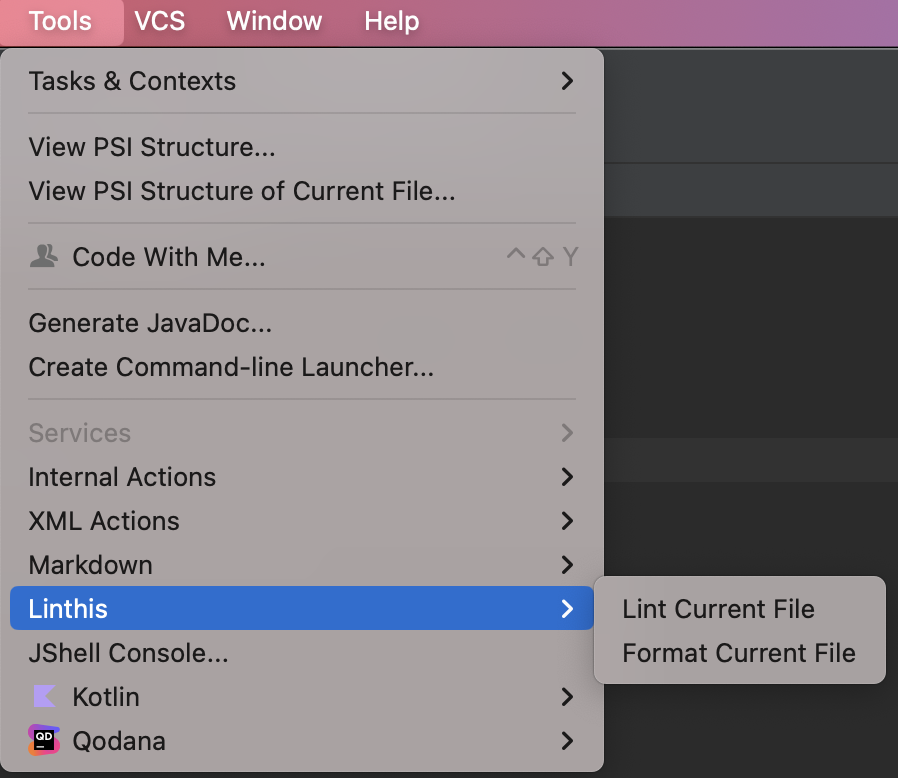
- Tools → Linthis 菜单操作
- 可配置的保存时格式化
7.3 Neovim
使用 lazy.nvim 安装:
```lua
-- ~/.config/nvim/lua/plugins/linthis.lua
return {
  "zhlinh/linthis",
  event = { "BufReadPre", "BufNewFile" },
  config = function(plugin)
    -- Add nvim-linthis subdirectory to runtimepath
    vim.opt.rtp:append(plugin.dir .. "/nvim-linthis")
    require("linthis").setup({
      format_on_save = false,
      lint_on_save = true,
    })
  end,
}
**可用命令**:

- `:LinthisLint` - 运行 lint
- `:LinthisFormat` - 格式化文件
- `:LinthisLintFormat` - lint 并格式化

## 8. CI/CD 集成

### GitHub Actions

```yaml
name: Lint

on: [push, pull_request]

jobs:
  lint:
    runs-on: ubuntu-latest
    steps:
      - uses: actions/checkout@v4
      - name: Install linthis
        run: pip install linthis
      - name: Run linthis
        run: linthis --check-only --output github-actions
9. 总结
linthis 的设计理念是简单、统一、可扩展:
- 简单:一个命令处理所有语言
- 统一:统一的配置格式和 CLI 接口
- 可扩展:插件系统支持团队共享配置
无论是个人项目还是团队协作,linthis 都能帮助你保持代码质量的一致性。
相关链接:
- GitHub: https://github.com/zhlinh/linthis
- PyPI: https://pypi.org/project/linthis/
- Crates.io: https://crates.io/crates/linthis